Iron Banner is live! Learn more about the event by visiting out Iron Banner KB page!

Petition Sony to Develop Destiny 3! Sign the petition here. This will open change.org in a new tab.

Looking for Exotic Catalysts? Refer to our Exotic Catalysts Guide to view a searchable/filterable list of all exotic catalysts available in Destiny 2!
Check out our Pinnacle Ops page for written steps/video guides for Oblation: Bloodline, the brand new exotic mission!
Promote
Check out Game 2 Give by Bungie Foundation! Supporting can earn you emblems and other rewards!
Learn more about Kepler and its secrets with our guide, including featured video guides by content creators! This page now includes information on The Desert Perpetual raid!

Petition Sony to Develop Destiny 3! Sign the petition here. This will open change.org in a new tab.

Check out our Weapon Perks page to see the new Weapon Perks coming in Edge of Fate!

Petition Sony to Develop Destiny 3! Sign the petition here. This will open change.org in a new tab. It's at 389,000! Can we push it to 400K?!

Do not go silently into the night, Guardians. Use your voice. It has an impact, not just for Destiny and Bungie. Remember that!
Promote
Iron Banner is live! Learn more about the event by visiting out Iron Banner KB page!
Check out our Pinnacle Ops page for video guides for Pinnacle Ops activities. We've updated some of the featured video guides for the dungeon lairs and latest exotic mission, "Heliostat!"
Check out our Free Emblem Codes & Cosmetic Items page to view a list of all currently available free codes, including a brand new bundle (armor, ghost shell, sparrows and a shader)
Check out our Free Emblem Codes & Cosmetic Items page to view a list of all currently available free emblem codes!
Check out our Understanding Subclasses page to learn more about Prismatic!
We've overhauled our Crucible page to include an interactive Game Mode matrix and a new Map Callout Guide featuring infographics by Relikt!
Learn more about the Pantheon. We've overhauled our Endgame Ops page, now split into three pages: Raid, Dungeon and Pantheon!
Learn more about Destiny 2: Monument of Triumph here, Bungie's final update to Destiny 2. Additional: Return of the Director, Weapons, Artifacts & Focusing Preview, Sandbox and System Updates, Abilities and Armor Preview
Maintenance & Updates
Check out the latest update for Destiny 2 (v9.7.0, June 9, 2026)! Click here to view the patch notes.
Check out the latest update for Destiny 2 (v9.7.0.2, June 23, 2026)! Click here to view the patch notes. It is approx. 131 MB on Steam.
Visit our new Director page to access destination info. Look for the waveform icons beside destinations to listen to farewell messages from several voice actors from Destiny 2!
Several voice actors have said their farewell to Destiny 2. Visit our Director page to listen to their messages, available under 'Incoming Transmissions'.
Learn more about the Pantheon. We've overhauled our Endgame Ops page, now split into three pages: Raid, Dungeon and Pantheon!
Armor 3.0, Buildcrafting & Customization
Learn more about the Armor 3.0 system, how buildcrafting works and how to effectively customize your builds.
This page has been updated for Destiny 2: Monument of Triumph.
12 new buildcrafting guides have been added to the Video Guides section!

What is Buildcrafting?

  • In Destiny 2, players are able to obtain armor with random stats that can improve their Guardians’ capabilities; furthermore, there are mods that can be acquired that provide additional benefits.
  • Guardians who take the time to build and craft their armor can improve gameplay and overall performance toward in-game content.
  • This page will go over buildcrafting and general customization options available, updated to reflect  Armor 3.0.
  • Use the Quick menu in this section to jump to commonly sought after information, or use the bottom-right Table of Contents (book symbol).
June 17, 2026

Buildcrafting in Destiny 2

Frequently Asked Questions

What are the new Armor 3.0 Stats and what do they do?

Health

  • 1-100
    • Grants 0-70 healing when picking up an Orb of Power.
    • Grants 0-10% flinch resistance.
  • 100-200
    • Shields start recharging 0-25% more quickly and take 0-50% less time to fully recharge.
    • 0 – 20 Additional shield capacity vs combatants.

Melee

  • 1-100
    • Improves the base cooldown of your melee ability.
    • Improves the amount of melee energy gained from external sources and any melee regeneration speed scalars from other sources.
  • 100-200
    • 0-30% increased melee ability damage.
      • This includes powered, unpowered, and Glaive melees.

Grenade

  • 1-100
    • Improves the base cooldown of your grenade ability.
    • Improves the amount of grenade energy gained from external sources and any grenade regeneration speed scalars from other sources.
  • 100-200
    • 0-65% increased grenade ability damage.

Super

  • 1-100
    • Improves the Super energy gained from damaging targets.
      • It does not change the base cooldown time of your Super.
    • Improves the amount of Super energy gained from external sources and any Super regeneration speed scalars from other sources.
  • 100-200
    • 0-45% increased Super ability damage.

Class

  • 1-100
    • Improves base cooldown of your class ability.
    • Improves the amount of class energy gained from external sources and any class regeneration speed scalars from other sources.
  • 100-200
    • Grants a 0-40 HP Overshield (0-10 in PvP) on casting your class ability.
      • Duration is determined by the ability used.
        • Example
          • Dodge and Thruster last 5s.
          • Barricade and Rift last 10s.

Weapons

  • 1-100
    • Improves weapon reload and handling speeds.
    • Improves damage versus minor and major combatants.
      • (0-15% for primary and special, 0-10% for heavy)
    • 100-200
      • Grants a chance for ammo bricks produced to contain more ammo than normal.
      • Improves damage versus boss combatants and Guardians.
        • (0-15% for Primary and Special, 0-10% for Heavy).
        • Bonus weapon damage vs. players (0-6%).
What happened to Mobility, Resilience & Recovery?
  • As of Destiny 2: The Edge of Fate, old stats have been replaced with the new stat system:
    • Mobility is now Weapons
    • Resilience is now Health
    • Recovery is now Class
    • Strength is now Melee
    • Discipline is now Grenade
    • Intellect is now Super
  • For the stats going away with the new system, Bungie has set them to a fixed value for all players.
    • Mobility is fixed to what 30 once was for Titans and Warlocks, and 40 for Hunters.
    • Additionally, there are new leg armor mods to adjust this higher.
    • Resilience is fixed to what 100 once was.
    • Recovery is fixed to around what 60 once was.
What are buffs and debuffs?
  • Blueberries.gg explains this in the best way:
    • In Destiny 2, buffs and debuff are temporary effects that can be either placed on your character or on your enemy.
    • Buffs are effects that you can use on yourself to increase your damage output, whereas debuffs can be placed on enemies to make them weaker and thus receive higher damage.
  • Your abilities can provide buffs and debuffs as can armour mods
  • To learn more about buffs and debuffs, as well as best sources, visit the article, ‘Destiny 2 Buffs and Debuffs Guide‘ by Blueberries.gg.
    • Clicking on the link above will redirect you over to Blueberries.gg, a website created by Ric Molina.
How do I generate orbs in Destiny 2?
  • Orbs of Power can be generated in several ways:
    • Defeating enemies with your super
    • Equipping a Siphon Mod (via your Helmet armour) and getting rapid kills with the specified element or weapon
    • Equipping a subclass fragment that generates orbs using your ability (note that each subclass fragment has its own unique requirements)
  • Equipping multiple Siphon Mods will increase the potency of the orbs you generate, which provide additional super energy
  • You can gain additional benefits by socketing mods like AbsolutionInvigoration and Innervation (which can be found on your leg armour)
  • Keep in mind, you cannot pick up the orbs you create via your super − only Siphon Mods and very specific mods.

Overview: Understanding Your Armor & Armor 3.0

  • Destiny 2 provides multiple ways of adjusting your armour, ranging from cosmetic upgrades to improving your stats and gameplay
  • Every legendary and exotic armour piece has mod slots, and an appearance customization screen.

Armor 3.0 Stats

  • Armor 3.0 uses six build-focused stats.
  • Each stat feeds a different part of your kit, helping you tune your Guardian around weapons, survivability, class ability uptime, grenade, melee or supers.

Weapons

Formerly Mobility

Improves weapon-focused performance and helps builds that rely on consistent gunplay.

Best For

  • 1

    Weapon damage builds, boss damage windows, and Champion burn.

  • 2

    Players who want stronger weapon feel, uptime, and neutral-game performance.
Gunplay DPS Ammo

Health

Formerly Resilience

Improves survivability and helps builds stay alive in higher-pressure combat.

Best For

  • 1

    Solo play, endgame content, and safer close-range combat.

  • 2

    Builds that need more room to recover, reposition, or survive mistakes.

Survival Endgame Safety

Class

Formerly Recovery

Improves class ability uptime and supports builds that revolve around your class tool.

Best For

  • 1

    Dodge, barricade, rift, class ability, and utility-focused builds.

  • 2

    Loops that trigger healing, reloads, repositioning, summons, or subclass effects.

Utility Class Loop Uptime

Grenade

Formerly Discipline

Improves grenade-focused builds that rely on ability pressure, control, and elemental effects.

Best For

  • 1

    Grenade uptime, add-clear, area denial, and subclass verb application.

  • 2

    Builds where grenades are the main source of damage, control, or ability chaining.

Grenades Control Add-Clear

Melee

Formerly Strength

Improves melee-focused builds that fight up close or chain powered melee effects.

Best For

  • 1

    Powered melee uptime, close-range builds, and aggressive ability loops.

  • 2

    Players who use melee abilities to trigger healing, damage, movement, or subclass verbs.

Melee Aggressive Close Range

Super

Formerly Intellect

Improves Super-focused builds that care about burst windows, boss damage, and major combat moments.

Best For

  • 1

    Super uptime, burst damage, boss phases, and high-impact ability rotations.

  • 2

    Builds that convert weapon or ability pressure into stronger Super payoff.

Super Burst Boss Damage
Hover over a stat icon on your character screen to view a breakdown of what the stat means and what your current bonuses are for that stat. Image by Benny. Click this image to open his video guide!

Mod Slots & the Mod Customization Screen

  • There are several different mod slots available on armour!
  • Each mod slot has its own group of mods that can be slotted.
  • Mods have an energy cost − and each armour piece has a maximum energy amount of 10 (when it’s masterworked), which is divided by what mods you’ve equipped.
  • Players can use the Mod Customization Screen to adjust all mods all at once, similar to the Armour Customization Screen for adjusting your Guardian’s appearance!
Braytech Integration: Armour Screen Example
Braytech Integration
  • In this example, courtesy of Tom Chapman's Braytech website, select and equip mod slots to see what each mod slot does and how they impact the armour piece's stats!
  • This example is showing a chest armour piece with a solar affinity; only chest mods, solar and non-element specific mods will be displayed.
  • We are not affiliated with Braytech. For any inquiries related to this app, please reach out to @BraytechHelp via Twitter!

Armour Customization

  • Players can adjust their armor appearance by applying shaders (colours) and ornaments
  • Shaders can be acquired from Eververse or a rare drop from dismantling certain weapons.
  • Legendary armor support Universal Ornaments that can be acquired through Armor Synthesis.
Armour Synthesis - Synthweave Strap (Hunter)
Armour Synthesis - Synthweave Plate (Titan)
Armour Synthesis - Synthweave Bolt (Warlock)

Ability Stats & Recharge Rates

  • As a part of this major rework, all base recharge rates of abilities are retuned with Armor 3.0 to better align with the way the new stats work.
    • At low stat investment (0-30) your abilities will be recharging slower than they used to, but at high investment 70-100, they will be recharging faster.
    • Any “chunk” energy gains (think Demolitionist-like perks that provide a direct amount) and any energy recharge scalars (think Crown of Tempests) will also now be scaled by your stat investment.
      • At 70 stat, they will match the live game values and surpass them up to 100 stat.
      • Below 70 stat they will give less value than the live game.
  • In the prior system before Edge of Fate, stats had a 10 tiers…every 10 points would provide an increase in effectiveness with a max total of 100 points.
  • For example, if you had 74 Mobility, you would be at a Tier 7 bonus.
    • Regardless if you had 74 points or 76 points, it would be a Tier 7 bonus, with 4-6 wasted points.
  • In the new system, every point in your armor stats count.
    • So in the new system, 74 points is an increase from 70-73…every point matters!
A comparison of how the old system worked before Edge of Fate and the new system. Image by Benny. Click the image to open his video guide!

Archetypes & Armor Tiers

  • Destiny 2 has introduced a brand new armor tier system (Gear Tiers), replacing the original system.
  • Higher-tear armor provides additional stats and may come with additional benefits depending on the type of armor.
  • The higher the tier, the more stat points it can drop with.
  • Armor can drop across five Gear Tiers (in bracket values are masterworked armor):
    • Tier 1: 52-57 (67-72)
    • Tier 2: 58-63  (73-78)
    • Tier 3: 64-69 (79-84)
    • Tier 4: 70-75 (85-90) + Extra Mod Energy
    • Tier 5: 75 (90) + Extra Mod Energy + Randomly Tuned Stat
  • Additional Details about Armor Tiers:
    • Tier 1–4
      • Stat rolls increase with tier.
      • No Tuning Mod slot.
      • Lower max stat points.
    • Tier 5:
      • Max rolls available.
      • Provides 11 energy.
      • Includes a Tuning Mod slot (Tuning Mods let you fine-tune your build—perfect for hitting stat goals like 200 Super or balancing min-maxed builds), allowing:
        • +5/-5 Swap Mods: A mod that allows you to increase (+5) the armor’s tuned stat at the cost of a small amount of another stat (-5).
        • Balanced Tuning Mod: +1 to each of three lowest stats.
        • Enables perfect builds when combined with masterwork and mod points.
The various types of armor tuning mods available for Tier 5 armor.

Archetype Breakdown

Armor 3.0

Armor Archetype Finder

Use this table to find which Armor 3.0 archetype best feeds your build. Archetypes determine the two highest stats on an armor drop: the Primary stat and the Secondary stat.

12 Archetypes
Tip: use a matching Ghost Armorer mod when chasing a specific archetype.

How do I know what kind of armor archetype I have?

  • To see what kind of armor archetype you have, you can hover over an icon on the bottom right of your armor inventory screen:
The various types of armor tuning mods available for Tier 5 armor.

How do you acquire Tiered armor?

  • Tier 1–4 armor can drop from regular raids, dungeons, and seasonal activities, unlocking increasingly better stats as you progress.
  • Tier 5 armor is exclusive to Edge of Fate content and beyond.
    • Legacy armor cannot be upgraded.
    • Tier 5 is not obtainable through standard gameplay… you’ll need to conquer endgame activities such as master-level or Grandmaster-level content, or new dungeons and raids released after Edge of Fate.

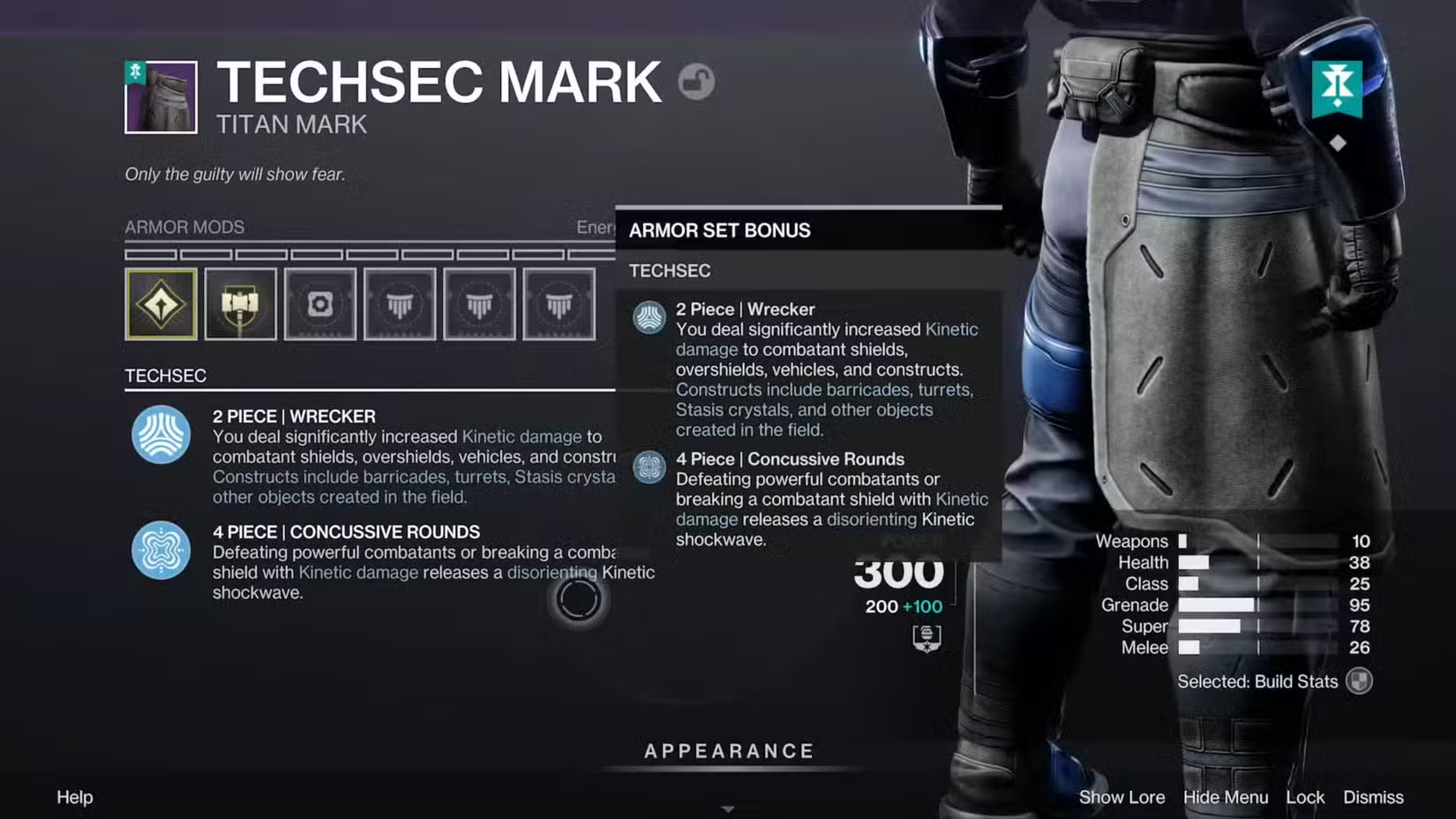
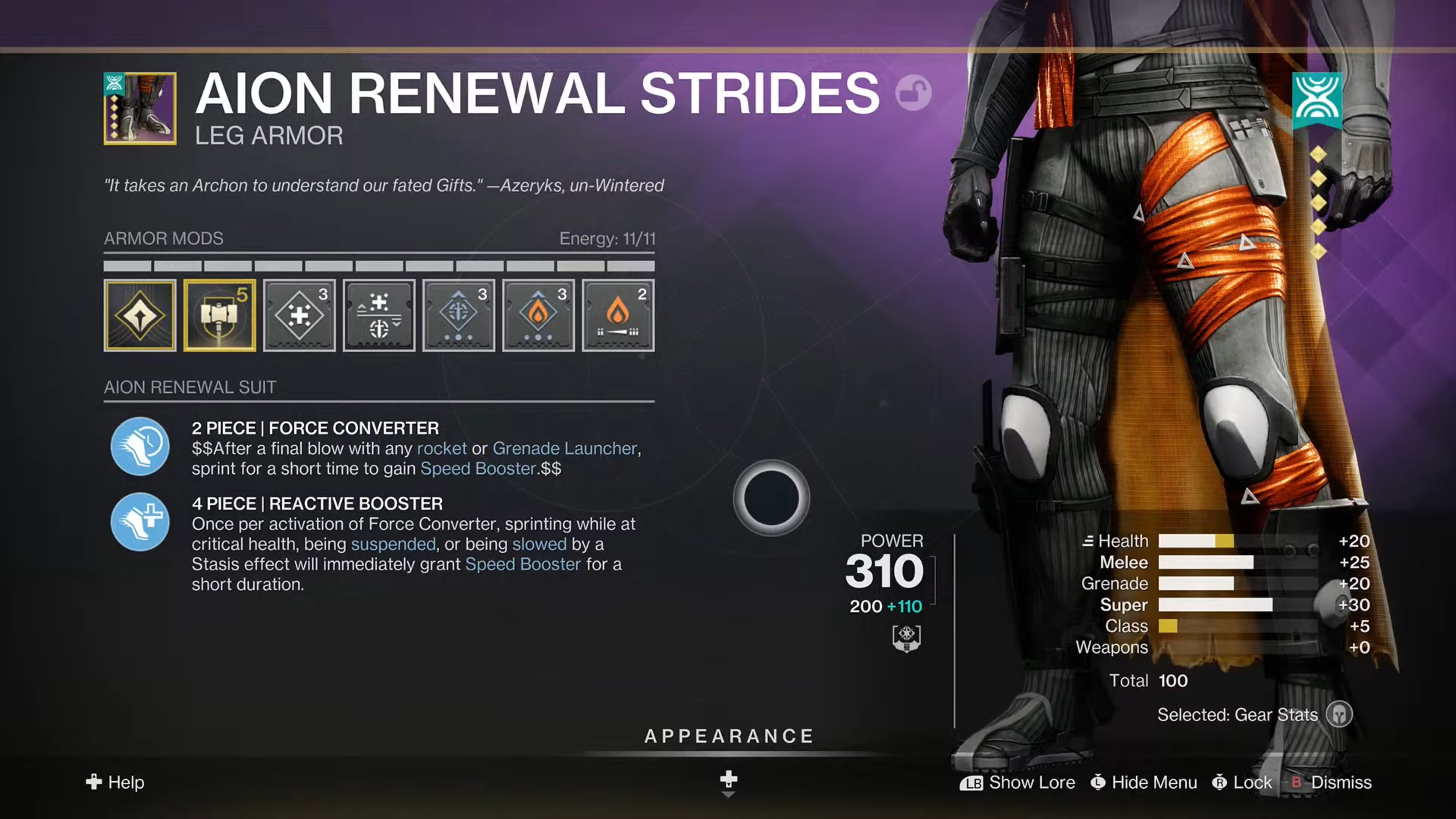
Armor Set Bonuses

  • Armor set bonuses are perks granted by equipping multiple pieces from the same armor set.
    • Equipping two pieces activates the first set bonus.
    • Equipping four or more pieces activates the second set bonus.
  • You can commit to one armor set for both bonuses, or mix two different sets together to activate two separate 2-piece bonuses.
    • This allows you to build around a single theme or combine smaller bonuses from different activities.
  • Armor set bonuses appear on Armor 3.0 sets, including newer armor and updated raid/dungeon armor brought forward into the tiered reward system.

Mix and Matching Armor Set Bonuses

  • If you like the 1st set bonus of one armor set, and the 1st set bonus of another, you can mix and match!
  • As long as you equip two pieces of armor from a single set, you’ll get the 1st set bonus of that armor set.
Click to expand!

Exotic Armor and Armor 3.0

  • Exotic armor uses Armor 3.0 stats and archetypes, but it does not visibly display a Gear Tier like Legendary armor.
  • As of Monument of Triumph, Exotic armor now has Tier 5 stat behavior and access to all Tuning Mods.
  • This change applies retroactively to Armor 3.0 Exotic armor, excluding Collections rolls.
  • This means Exotic armor should now be treated as endgame-ready from a stat-tier perspective, while still being evaluated by its archetype, stat distribution, Exotic perk, and how well it fits your build.

Armor Mods

App Integration: Destiny 2 Armor Picker by Mijago
IMPORTANT: Before Logging Into the App
  • Bungie.net does not support embedded content; if authentication is required, please login through this link instead, otherwise, the embedded view below will respond with an error.
    • This will open the link in a new tab where you can log into your Bungie Account. 
    • Once authenticated, refresh this page; going forward, or until you reset your browser cache or manually log out of that app, you should remain logged into the app.
  • We are not affiliated with Destiny 2 Armor Picker. For any inquiries related to this app, please reach out to Mijago via Twitter!
  • Most mods will be unlocked by achieving Guardian Rank 6.
  • Note that most players who have already been playing the game will start out at Rank 6 and instantly unlock all general mods.

Armour Charges

  • As of Destiny 2: Lightfall, Mods that once belonged to Charged With Light and Elemental Well subfamilies of mods now fall under a revamped system known as Armour (Armor) Charge and will be moved into armour slot-specific sockets
  • Warmind Cells are no longer available and have been deprecated.
  • As explained by Bungie, the core mechanics of Armour Charge mods are as follows:
    • Socketing an armour mod that uses the Armour Charge system gives you access to the system.
  • As long as you have a Consuming (Yellow) or Passive (Blue) Armour Charge mod equipped, you can begin generating armour charges
  • You can hold between 0 – 3 stacks of Armour Charge by default, which will appear in the Status Effects area on your screen (above your super icon)
    • Players can increase their total armour charge capacity by equipping Charge Up Mods to a max up 6 armour charges.

PvE

  • Weapon Surge Mods: Surge Mods, available on leg armour, can increase your overall DPS, which is great for endgame content such as raid, dungeons or Grandmaster Nightfalls.
    • Note that these mods are Passive (blue) mods which cause Armour Charge Decay, removing one stack of armour charge every 10 seconds.
    • You can slow down the decay by equipping ‘Time Dilation’ mods.
  • Kickstart Mods: Available on Arms/Class items, kickstart mods provide ability energy in exchange for armour charge stacks.

PvP

  • Font Mods: Improves your armour stats, which also provide improved cooldowns on your abilities.
    • It is recommended to equip ‘Time Dilation’ mods to slow down the decay time caused by these mods.
  • 1 − Acquire armour charge mods via Guardian Ranks.
    • Veteran Players will already achieve Rank 6 at the start of Lightfall and will have most mods unlocked. Additional mods can be unlocked while progressing to Rank 7.
  • 2 − Equip a Consuming (yellow) or Passive (blue) Armour Charge mod on one or more of your armour pieces.
    • 🛑 Players won’t generate armour charges if no armour charge mods are equipped.
  •  3 − Ensure your Guardian has sources of orb generation.
    • Equipping Siphon mods on your helmet, other mods, subclass fragments, or using your super are all common sources of orb generation.
  • 4 − Destroy enemies of humanity, pick up orbs, and buildcraft based on your gameplay style.

Mod Affiliation with Armour Pieces

  • Certain types of mods are only available on certain armour pieces
    • For example, if you’re wanting a target acquisition mod, those mods are only available on helmet armour pieces
  • With the changes in Lightfall, most mods are now merged into general mods based on element or ammo type (ex: Primary, Special, Heavy)
    • The mod icons will show ammo/element as required.
Ammo Finder Mod
AMMO FINDER MODS
  • Grants a chance to find bonus ammo, with an increased chance when defeating combatants with primary weapons.
  • Found on Helmet Armour.
  • Recommended for PvE activities.
Targeting Mod
TARGETING MODS
  • Increases target acquisition for weapons matching the mod element type.
  • Found on Helmet Armour.
  • Recommended for PvP activities.
Reloader Mod
RELOADER MODS
  • Increases reload or nock speed for weapons matching the mod element type.
  • Found on Arm Armour.
Dexterity Mod
DEXTERITY MODS
  • Increases ready and stow speed for weapons matching the mod element type.
  • Found on Arm Armour.
Reserves Mod
RESERVES MODS
  • Increases the amount of ammo you can carry for weapons matching the mod element type.
  • Found on Chest Armour.
  • Helpful for PvE activities.
Unflinching Aim Mod
UNFLINCHING MODS
  • Reduces flinch from enemy fire for weapons matching the mod element type.
  • Found on Chest Armour.
  • Recommended for PvP activities.
Scavenger Mod
SCAVENGER MODS
  • Increases the amount of ammo you get from ammo bricks for weapons matching the mod element type.
  • Found on Leg Armour.
  • Helpful but very expensive.
Holster Mod
HOLSTER MODS
  • Gradually reloads stowed weapons over time matching the mod element type.
  • Stacking mods increases its effectiveness. 
  • Found on Leg Armour.
MOBILITY MODS
  • Increases movement speed and/or jump height.
  • Found on Leg Armour.
  • Excellent for traversal-centric builds and overcoming mobility drop from stat shift.
  • A triple stack would bring your mobility to what 90 mobility used to feel like before Armor 3.0.

Armor Charge Variations

  • With the Armor Charge system, there are three colour variations of Armor Charge mods that behave in a specific way:
Armour Charges_Generation
GENERATE
  • Green Armour Charge mods provide enhancements to your Armour Charges, such as providing additional charges or reducing the time decay from decaying mods.
  • These mods can also provide other ways of granting armour charges, such as performing a finisher.
Armour Charges_Consume
CONSUME
  • Yellow Armour Charge Mods provide a benefit at the cost of consume one or more Armour charges
  • For example, the ‘Healthy Finisher’ will consume 1 armour charge to regenerate your health.
Armour Charges_Decay
PASSIVE (DECAY)
  • Blue Armour Charge mods provide passive benefits but cause your built-up armour charges to decay after a set duration
    • By default, armour charge stacks will decay once every 10 seconds.
  • You can equip ‘Time Dilation’ to reduce the time decay; equipping several mods will further reduce the decay timer, with diminishing returns per mod equipped.

Loadouts & Helpful Apps

  • As of Destiny 2: Lightfall, a new Loadout system is now available for all players.
  • Gain access to Loadout Systems by increasing your Guardian Ranks.
  • Loadouts enable you to:
    • Quickly swap entire sets of gear without numerous trips to the vault or having to open a second screen.
    • Decrease the time in between play sessions caused by needing to rebuild a loadout.
    • Create ways to label loadouts for quick identification.
KB_Armour-Build-Crafting_Bungie_LoadoutScreen
DIM
Destiny Item Manager
What is this app?
DIM is a free, open-source app built by community developers upon the same services used by Bungie.net and the Destiny Companion App.

Access your entire inventory and vault as you would in the game.  The creators of DIM have confirmed that their in-app Loadout system will work alongside in-game Loadouts!
Open DIM
MIJAGO
D2 Armor Picker
What is this app?
There is currently a third-party website that, when you authenticate your Bungie account, can load all of your armour and displays all possible armour combinations to perfect your stat distribution!

Even further than that, you can also fine-tune the data it provides with filter options to tailor to what you want your build to be. This app can also connect with DIM!
Open D2 Armor Picker

Video Guides

Build Crafting Video Guides
Titan Builds
Warlock Builds
Hunter Builds

Leave a Comment!

Subscribe
Notify of
guest

This site uses Akismet to reduce spam. Learn how your comment data is processed.

0 Comments
Oldest
Newest Most Voted
© 2026 − SHATTERED VAULT — NOT AFFILIATED WITH BUNGIE, HASBRO OR SCOPELY
0
Leave a comment!x
()
x